How to get a short link with your own domain
Turn go.yourbrand.com into your own short link domain. One CNAME record, about 10 minutes, no coding. Step-by-step setup for Cloudflare, GoDaddy and more.
To get a short link with your own domain, pick a subdomain like go.yourbrand.com, add it in a link shortener that supports custom domains, and create one CNAME record at your DNS provider pointing that subdomain to the shortener. Once the record resolves, every new short link uses your domain, for example, go.yourbrand.com/spring-sale. Setup takes about 10 minutes and needs no code.
A generic short link like snipvio.com/x7Kp2Qa works. But it doesn't tell anyone who sent it. A link like go.yourbrand.com/menu does, before anyone taps it.
That matters more than it sounds. People have learned to be careful with short links, because scammers use them to hide where a link really goes. When your own name is in the link, readers can see it's from you. It also keeps your brand in front of people every time the link gets shared, printed or read out loud.
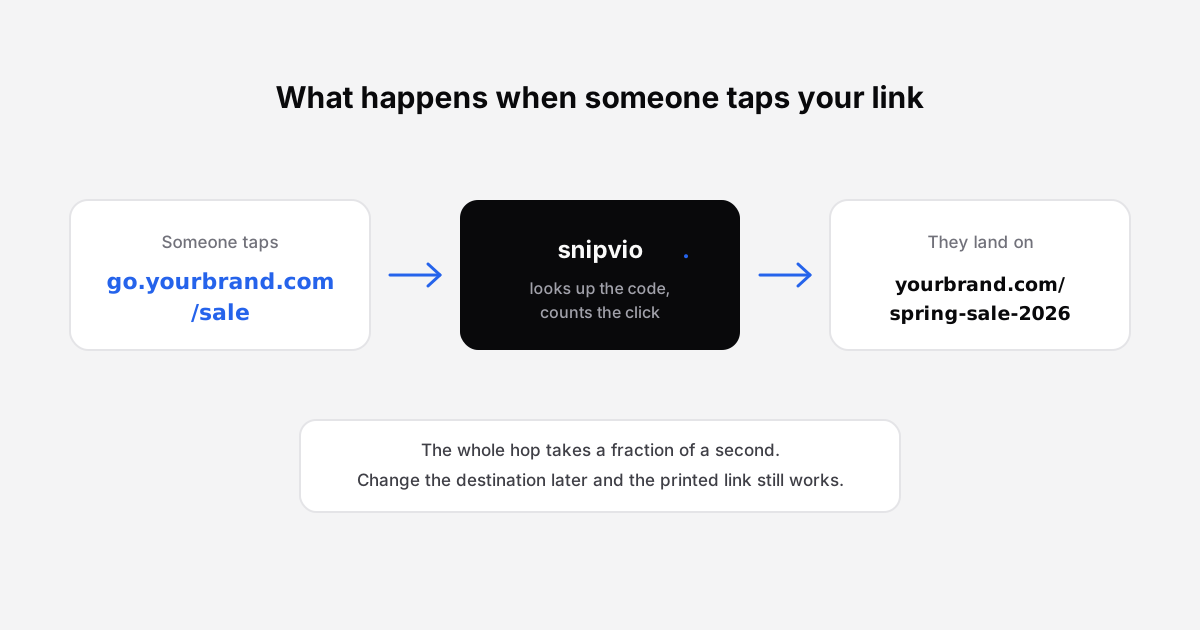
This guide walks through the whole setup: what you need, the exact DNS record to add, how to choose a good short domain, and the mistakes that stop most setups from working.
Why use your own domain for short links?
- Trust. Readers can see the link comes from you, not from a random shortener.
- Branding. Your name appears in every post, email, QR code and printed flyer.
- Memorability. go.yourbrand.com/webinar is easy to say on a podcast or type from a poster. A random code isn't.
- Portability. The links live on a domain you own. If you ever change tools, you control the DNS record behind them.
- Cleaner analytics. Every click on your branded links is yours, so it's easy to see what your own campaigns drive.
For more on why branded links tend to get more clicks, see Why branded short links get more clicks.
What you need before you start
You need three things. If you already have a website, you probably have the first two.
- A domain you own. Either your main domain (yourbrand.com) or a separate short one (brnd.co). You'll use a subdomain of it, not the domain itself.
- Access to its DNS settings. This is wherever your domain's nameservers point: often your registrar (GoDaddy, Namecheap) or a DNS service like Cloudflare. If you're not sure, look up your domain's nameservers. The provider they belong to is where you add records.
- A link shortener that supports custom domains. Not every shortener does, and many only include it on paid plans. Check which plan you need before you start.
Subdomain or root domain?
Use a subdomain. A subdomain is the part before your domain, like go.yourbrand.com or link.yourbrand.com.
Don't point your root domain (yourbrand.com) at a link shortener. That's where your website lives. Redirecting it would send every visitor to the shortener instead, and your site would effectively go offline.
Good subdomain names are short and obvious:
| Subdomain | Example link | Works well for |
|---|---|---|
| go | go.yourbrand.com/sale | Almost anything. The most common choice. |
| link | link.yourbrand.com/podcast | Content and social posts |
| try | try.yourbrand.com/demo | SaaS signups and trials |
| shop | shop.yourbrand.com/new | Ecommerce campaigns |
| s | s.yourbrand.com/menu | The shortest option, good for QR codes and print |
How to set up a short link with your own domain
The steps below use Snipvio as the example, but the DNS part works the same with any shortener that supports custom domains.
Choose your subdomain. Pick one from the table above. In this guide we'll use go.yourbrand.com.
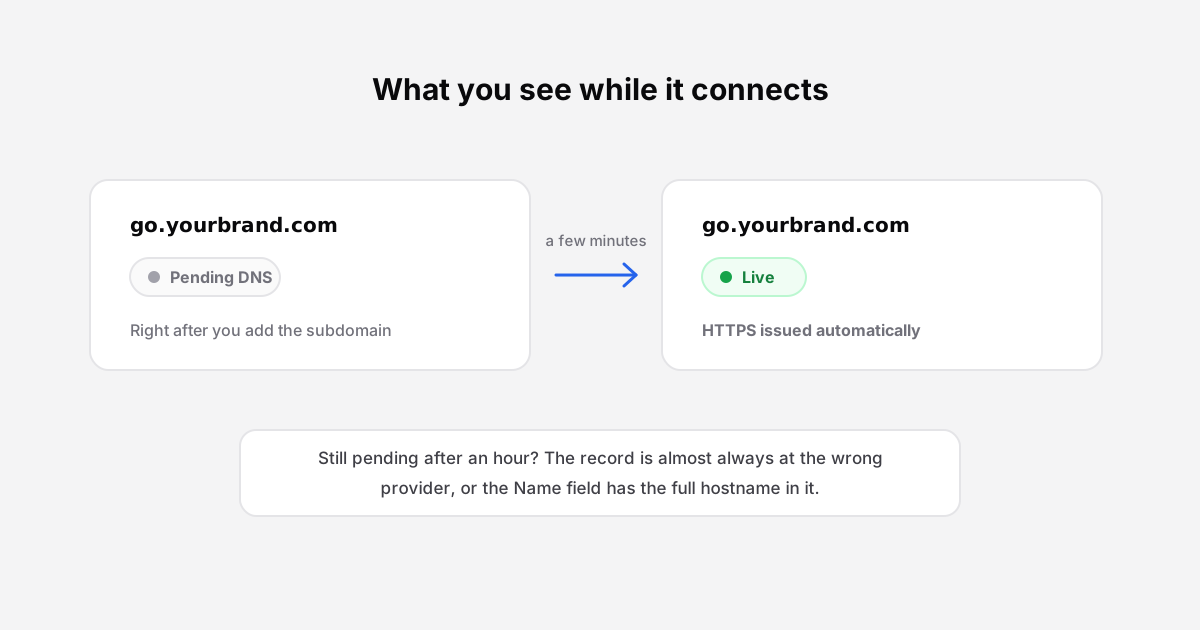
Add the subdomain in your link shortener. In Snipvio, go to Dashboard → Custom Domains and enter go.yourbrand.com. It will show as Pending DNS until the record is in place.
Create a CNAME record at your DNS provider. Add one record with these values:
Field Value Type CNAME Name (or Host) go Target (or Value, Points to) snipvio.com TTL Auto, or the provider's default 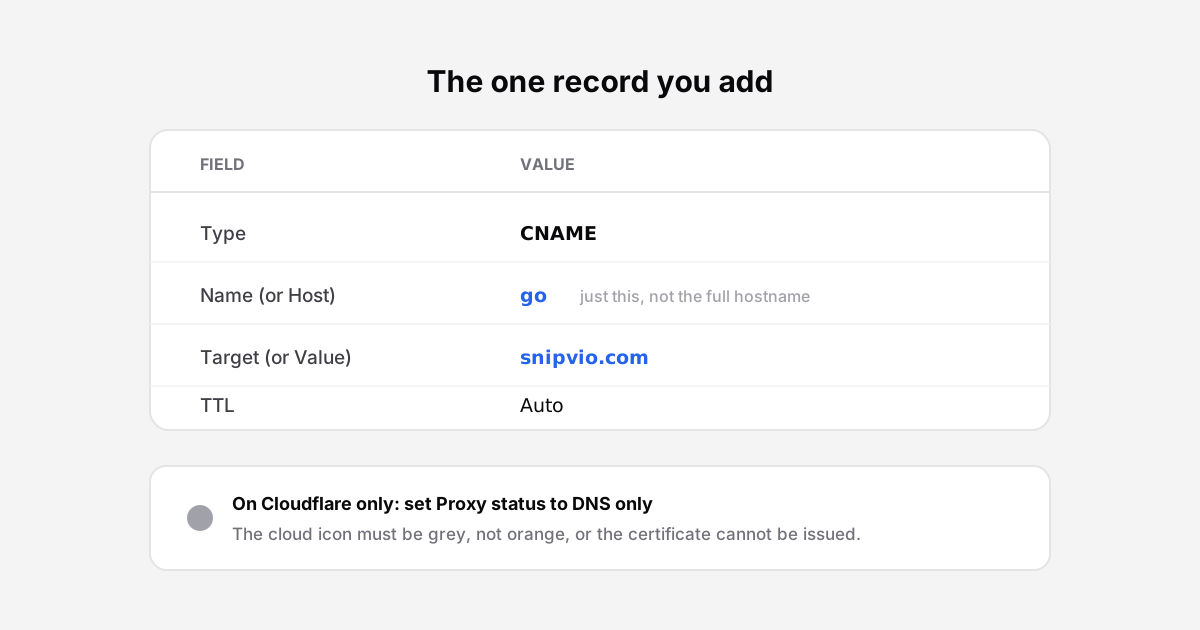
Enter only the subdomain ("go") in the Name field. Most providers add your domain automatically, so typing go.yourbrand.com there creates go.yourbrand.com.yourbrand.com, which won't work.
Verify the record. Back in Snipvio, click Check DNS. The status changes from Pending DNS to Live once the record resolves. That usually takes a few minutes, occasionally up to an hour. Snipvio issues the HTTPS certificate for you, so there's nothing else to install.
Create a link and test it. Shorten any URL. The new link will use go.yourbrand.com. Open it in a private browser window and on your phone, and if you'll print it, scan its QR code too.
Links you made before connecting the domain keep working on their original address. Only new links use the custom domain.
Notes for popular DNS providers
The record is the same everywhere. Only the menu names change.
- Cloudflare: DNS → Records → Add record. Set Proxy status to DNS only (grey cloud). If the cloud is orange, Cloudflare sits in the middle and the HTTPS certificate can't be issued. Full Cloudflare guide
- GoDaddy: Domain → DNS → Add New Record → CNAME. Put "go" in Name and snipvio.com in Value. Full GoDaddy guide
- Namecheap: Domain List → Manage → Advanced DNS → Add New Record → CNAME Record. Put "go" in Host and snipvio.com in Value. Full Namecheap guide
One thing to check first: if your domain's nameservers point to Cloudflare, add the record in Cloudflare, not at your registrar. Records added anywhere else are ignored.
Should you buy a separate short domain?
You don't have to. A subdomain of your main domain (go.yourbrand.com) is the simplest option, costs nothing extra, and readers instantly recognise it.
A separate short domain makes sense when your main domain is long. If your site is mountainviewphotography.com, a short domain like mvp.photo gives you links that fit on a business card. You'd still use a subdomain of it, such as go.mvp.photo.
If you do buy one:
- Keep it close to your brand name. Readers should recognise it without guessing.
- Avoid hyphens and lookalike characters. "l" and "1", or "0" and "O", cause typos when people type links from print.
- Check renewal prices, not just the first-year price. Some unusual extensions are cheap to register and expensive to renew.
- Turn on auto-renew. If the domain expires, every link on it stops working.
Common mistakes that stop it from working
| Problem | What you'll see | Fix |
|---|---|---|
| Full hostname typed in the Name field | Still "Pending DNS" after an hour | Change Name to just "go" |
| Record added at the wrong provider | Still pending | Add it wherever your nameservers point (often Cloudflare) |
| Cloudflare proxy turned on (orange cloud) | Domain verifies, but HTTPS fails or the link errors | Switch the record to DNS only (grey cloud) |
| A record used instead of CNAME | Still pending | Delete it and add a CNAME pointing to snipvio.com |
| An old record already exists for "go" | The provider won't save the new one | Delete the old record first |
| Root domain pointed at the shortener | Your website disappears | Point the root back to your host. Use a subdomain instead. |
| Domain left to expire | Every branded link stops working | Turn on auto-renew at your registrar |
How Snipvio handles custom domains
Custom domains are included in Snipvio's Pro plan ($14.99/month, one domain). The Business plan, currently on a waitlist, includes five. A few details are worth knowing:
- Only your links work on your domain. Nobody else can create a link on go.yourbrand.com, so scammers can't borrow your name for phishing links.
- HTTPS is handled for you. The certificate is issued automatically once the CNAME resolves.
- Bot clicks are filtered. Clicks from link-preview bots and crawlers are counted separately, so your branded links show real human clicks. How bot filtering works
- Your links are never lost. If you disconnect the domain, it stops answering right away, but every link keeps working at its snipvio.com address.
Full setup details are in the custom domains guide.
Frequently asked questions
Can I use my own domain for short links for free?
Some shorteners allow it, but most put custom domains on a paid plan, because each domain needs its own HTTPS certificate. On Snipvio, custom domains start on the Pro plan. The free plan uses snipvio.com links.
How long does it take for a custom short domain to work?
Usually a few minutes after you add the CNAME record. Occasionally DNS takes up to an hour to update. If it's still pending after that, check the common mistakes table above.
Will a short link subdomain affect my website or SEO?
No. A CNAME on a subdomain like go.yourbrand.com doesn't touch your main site or its rankings. Your website keeps running on yourbrand.com as before. For how short links redirect, see What is a URL shortener, and how does it work?
Can I use my root domain instead of a subdomain?
No. Your root domain is where your website lives, and pointing it at a shortener would take your site offline. Use a subdomain such as go., link. or s.
What happens to my links if I stop using my custom domain?
On Snipvio, every link keeps working at its snipvio.com address. Links that were shared or printed with your custom domain stop working on that domain, though. If you've printed them, keep the domain connected.
Can other people create links on my domain?
No. Snipvio only resolves your own account's links on your connected domain.
Start with your own branded links
A branded short link takes about 10 minutes to set up and pays off every time someone sees it. Create a free Snipvio account, then upgrade to Pro when you're ready to connect go.yourbrand.com.
Start shortening for free
50 links a month, QR codes, and links that never expire.
Create your free accountKeep reading
Why your link click numbers are probably wrong
Bots inflate link analytics more than most people realise. Here is what is happening and how to read your data honestly.
Why branded short links get more clicks
What a custom domain changes about trust and click-through, and how to set one up in a few minutes.